By Shivam Das | Updated October 11, 2026
Quick answer: If you want a candle warmer lamp controlled from your phone, the SwitchBot Candle Warmer Lamp is a current app-connected option with dimming, scheduling, and smart-home integration features advertised by the manufacturer. It is different from plugging an ordinary warmer into a smart plug: some models with inline controls do not automatically resume when power returns. Check jar-size limits, Wi-Fi requirements, platform support, and the manufacturer's safety instructions before buying.
“Smart” can mean native app control, Matter compatibility, voice-assistant support, or a basic smart plug. These options do not provide the same functions. This guide compares the practical features, setup considerations, and user-reported limitations rather than treating every connected warmer as equivalent.

What counts as a smart candle warmer?
- Native app control: Adjust supported settings and schedules in the maker's app.
- Matter or smart-home integration: Control through a compatible home platform when network and software requirements are met.
- Smart plug control: Usually switches power only; it may not operate a dimmer or timer built into the warmer.
- Remote or inline controller: Useful, but not necessarily connected to Wi-Fi or an app.

SwitchBot Candle Warmer Lamp: features and fit
SwitchBot's US product page advertises app-based dimming from 1% to 100%, on/off schedules, and Matter integration, with compatibility claims for Apple Home, Alexa, Google Home, Homey, Home Assistant, and SmartThings. Its published limits are a maximum candle diameter of 3.74 inches and table-to-shade distance of 5.51 inches. A wide or tall candle may not fit even if the connected features suit your routine.
The standard edition was listed at $39.99 at the time of research, with gift-box options priced differently. Price, stock, compatibility, and software features may change; confirm the current listing before purchase.
Potential strengths: connected dimming and schedules; published jar limits; official app and Matter setup guidance.
Things to check: jar size, your preferred smart-home platform, network reliability, and whether you actually need remote access. App control does not automatically mean stronger fragrance or better warming performance.

How app setup works
SwitchBot's support guide advises updating the app, powering on the lamp, adding the Candle Warmer Lamp from the device list, entering pairing mode, and completing connection on a 2.4 GHz Wi-Fi network. The guide notes that beta app versions may cause pairing issues.
- Update the app and device firmware if prompted.
- Keep the phone and warmer near the router during pairing.
- Check that the router offers 2.4 GHz Wi-Fi and enter the network credentials accurately.
- Pair the lamp in the app, then configure any supported smart-home integration separately.
- Test the physical controls and app functions while present before relying on schedules.

What real users report about connectivity
User reports are mixed. Some owners describe successful app use and scheduling, while others report difficulty pairing with Matter or keeping the warmer online in third-party systems. These individual experiences are not a formal reliability test, but they are worth considering before buying.
Read the original Reddit discussion. Comments are user-generated and do not guarantee the same experience for every owner.
Can a smart plug make a regular warmer smart?
Sometimes, but do not assume it will work. A warmer with an electronic inline button, dimmer, or timer may not resume its previous state after a smart plug restores power. A smart plug may also be unable to control brightness or the warmer's built-in timer. Avoid modifying the warmer's wiring; choose a model designed for connected control or ask the manufacturer about supported setups.

Smart candle warmer safety checklist
- Use a flat, heat-resistant surface away from curtains, paper, bedding, children, and pets.
- Use only the bulb and wattage specified by the manufacturer.
- Keep the jar within stated height and diameter limits, centered and stable.
- Do not light the wick while the candle is under the warmer.
- Do not treat a schedule as permission to leave the warmer unattended; switch it off when finished.
- After a power outage, router change, or software update, confirm the device state and schedules.
- If it unexpectedly activates, overheats, or repeatedly disconnects, stop using it and contact the manufacturer.
Who should buy a smart candle warmer?
A connected warmer may suit people who want routines, app-based dimming, or integration with an existing smart-home platform. It may be unnecessary if you prefer manual controls, have unreliable Wi-Fi, or do not need remote access. Prioritize safe fit and reliable controls, then decide whether connected features are worth paying for.
Frequently asked questions
Does SwitchBot Candle Warmer Lamp work with Apple Home?
SwitchBot describes Matter-based Apple Home setup. Follow current manufacturer instructions and check the requirements of your home hub, network, and software version.
Does it need 2.4 GHz Wi-Fi?
SwitchBot's app setup guide instructs users to connect using 2.4 GHz Wi-Fi. Check the current guide if pairing fails on a combined-band router.
Will a smart plug make any candle warmer app-controlled?
No. A smart plug usually switches power and cannot operate an inline dimmer or timer. Some warmers may not restart automatically after power returns.
Can I control the warmer when away from home?
Remote access depends on the product, app, network, and platform setup. For safety, avoid scheduling a heat-producing device when nobody can monitor it.
Will it fit every candle jar?
No. SwitchBot lists a maximum candle diameter of 3.74 inches and table-to-shade distance of 5.51 inches. Measure your jar and verify current specifications.
Sources and further reading
- SwitchBot US: Candle Warmer Lamp product details
- SwitchBot Support: Add the warmer to the app
- SwitchBot Support: Matter setup instructions
- Reddit: user discussion about the SwitchBot warmer
- Reddit: Home Assistant setup experiences
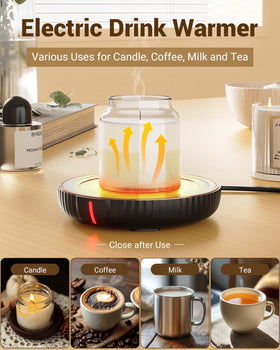
Editorial note: Written by Shivam Das. This is a research-based buying guide, not an independent hands-on test. Smart-home compatibility and product details may change. The lifestyle image is promotional model imagery, not a verified customer or reviewer photograph. Third-party image licensing has not been independently confirmed.